DBCL Cluster
This document describes the architecture and model of the new DBCL cluster for preproduction and production environment.
Acronyms and document referrals
- APPCL
Application Cluster
- DBCL
Database Cluster
- NFS
- NIS
- Postgres-XL
A distributed, fully ACID, multi-master cluster system for postgreSQL.
- Prod, Preprod, Svil
Production, Preproduction, Development environments
- RIAK
A distributed KV noSQL DB, created by Basho Technologies. Commercially supported by Erlang solutions.
- VRACK
OVH Vrack environment, to isolate servers from the outside
Architectural design
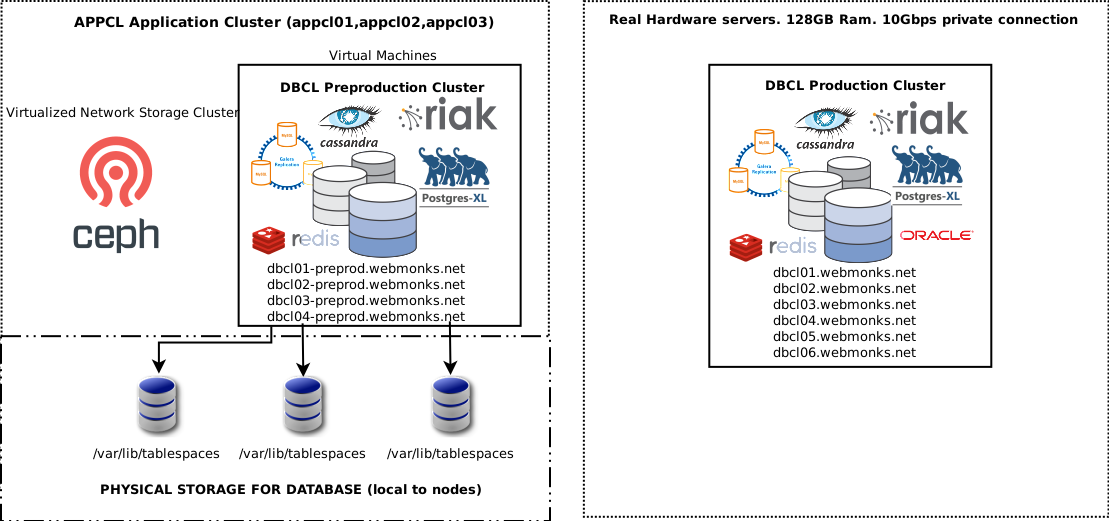
The new DBCL cluster is a cluster that offers several storage and queue services. At the time of writing the present document, these are the available services:
Postgres-Odoo Server[ (Only on dbcl01) Not available directly, see below ]Postgres-XL Cluster[ Running on port 5432 ]MariaDB GALERA Cluster[ Running on port 3306 ]Apache Cassandra Cluster[ Running on port 9042 ]REDIS Cluster[ Available ONLY on private address (10Gbit) on port 6379 ]RIAK Cluster[ Available ONLY on private address (10Gbit) on port 8098 ]ORACLE Database 12g(single server) [ Running on port 1521 ]
The backend nodes are named “dbcl” plus a number which identify the node number. Each of the database systems shares a segment of the RAM and disk of the physical servers. The ORACLE Database just runs on the dbcl03 node, while the Postgres-Odoo just runs on dbcl01. The Postgres-Odoo DB server is used just by Odoo, for incompatibilities towards XL. The Postgres-XL Cluster is balanced using a PgBouncer service which lets the clients forget about using their connection pooler. Just connect on port 5432, and remember to close your connection when you’re done. PgBouncer will let you reuse your connection transparently, if you reopen it. The Postgres-Odoo service is accessed using pgbouncer, which remaps internally the connection to dbcl01.
The available environments are:
Environment |
Public address (500Mbit) |
Private address (10Gbit) |
Private servers |
|---|---|---|---|
Production |
dbcl.webmonks.net dbcl-mysql.webmonks.net |
dbcl dbcl-riak dbcl-mysql dbcl-cassandra |
dbcl01 dbcl02 dbcl03 dbcl04 dbcl05 dbcl06 |
Preprod Development |
dbcl-preprod.webmonks.net dbcl-mysql-preprod.webmonks.net |
dbcl-preprod dbcl-riak-preprod dbcl-mysql-preprod dbcl-cassandra-preprod |
dbcl01-preprod dbcl02-preprod dbcl03-preprod dbcl04-preprod |
All the services are listening both on the internet (where they are conveniently closed using an iptables firewall, and opened only for source IP address which are allowed to use the services), and on the local VRACK interface, which runs at 10Gbit/s. If your server is in the new APPCL, by all means use the private address to enjoy a much faster connection. To check if your server is in the VRACK infrastructure, simply ping the private address in the table above and see if it answers.
Postgres-Odoo |
Only through PgBouncer service |
Postgres-XL Cluster |
Port 5432 (SSL Supported) using PgBouncer |
MariaDB GALERA Cluster |
Port 3306 (SSL Supported) |
Redis Cluster (only private interface) |
Port 6379 (Password auth required) |
Redis Cluster DEV (private interface) |
Port 6479 (Password auth required) |
Oracle Database 12g |
Port 1521 (SSL not supported) only dbcl03 |
Riak KV |
Port 8098 |
Regarding the Redis Cluster, please ask your current system administrator for the Redis Password that you must provide using
AUTH command when connecting to Redis Cluster.
We have a DEVELOPMENT redis cluster running on dbcl-preprod, port 6479. The development cluster password is: Sngop295.23
If you are using a NodeJS Client, by all means use ioredis package, and not the standard redis. This is because the ioRedis module also supports Redis Cluster.
Cassandra Cluster
Architecture
Currently, Cassandra is being used as:
A storage for MAM for XMPP service
You can check the current cluster status by becoming cassandra user on one of the available cassandra nodes (dbcl02-preprod,dbcl03-preprod,dbcl04-preprod for preproduction; dbcl04,dbcl05,dbcl06 for production/development), and type:
nodetool status
And you will see something like:
UN 172.16.0.4 18.33 GB 256 100.0% 0122262c-89ec-4616-af46-2b73957b3cfe rack1 UN 172.16.0.5 18.34 GB 256 100.0% 256caad6-663e-4e3d-9265-6eea86a614bb rack1 UN 172.16.0.6 18.33 GB 256 100.0% 3a6da37c-acb6-406b-9861-9d6a444cb57c rack1
Then, with the command line:
cqlsh -k KEYSPACE
You will be able to login the appropriate keyspace and do your queries. At the time of the present writing, the available keyspaces are:
For production: - mongooseim_prod
For preproduction: - mongooseim_preprod (xmpp-demo) - mongooseim_svil (xmpp-svil) - mongoosim_loadtest (xmpp-be-loadtest)
Postgres-XL
Architecture
You can find a lot of information here: https://www.postgres-xl.org/
The most meaningful addition in Postgres-XL, for a developer, is of course the DISTRIBUTION BY
clause of the ALTER TABLE command. Using the ALTER TABLE DISTRIBUTE BY <criterion> when
you create a table, for example for a new buddy, you can decide how data is going to be distributed
on all the datanodes of the XL cluster. There are presently four ways of data distribution:
REPLICATION Which means that ALL data is going to be replicated on all nodes, and, should a node fail, your data will keep being available to queries. This is the safest choice if you do not have much data to keep on the table, or you’re just not interested
HASH<column> With HASH, you can distribute data evenly by a hash of the primary key of the table.
MODULO<column> with MODULO, you can distribute by the MODULO of the column (good for integer or bools)
ROUNDROBIN Each row will be placed on each datanode in a RR manner, that is, every first row in the 1st cluster node, every second row in the 2nd, and so on.
Scripts
SQL Commands
Procedures
Recover stuck database in cluster
What you want to do when a db is stuck in an inconsistent state, is drop the db and recreate it from a backup. In Postgres-XL, with its many pieces, this procedure may involve some additional steps:
Drop the database
Check coordinators consistency
Restore the database
Warning
In (pre)production, dropping and recreating the database from a possibly 24-hours old backup may not be a viable option, and alternative procedures may need to be evaluated.
Drop the database
Launch the queries:
select * from pg_prepared_xacts;
select pg_cancel_backend(pid) from pg_stat_activity where datname='xmppbuddiessvil';
If it doesn’t return any pids, send a SIGTERM with pg_terminate_backend(pid). [1]
Now you can try to drop the DB. If it doesn’t work (which is probable because sequelize will have left everything locked), follow this subprocedure:
For each of the database cluster datanodes, connect to it directly using psql -p 3001, and execute the
queries above to unlock the resources using it. Now try to drop the db again, it should work.
Check coordinators
After having dropped the database from all datanodes, you’ll probably find that one of the coordinators is out of date and still sees it. In this case, you’ll have to recreate the coordinator to unstuck it. You can do so easily using pgxc_ctl:
1. Stop the coordinator:
pgxc_ctl stop -m immediate coordinator master dbcl01 (obviously use the stuck node)
2. Make a copy of the configuration file:
cp cluster/coord01/postgresql.conf ~/postgresql.conf.backup
3. Remove the coordinator:
pgxc_ctl remove coordinator master dbcl01 clean
4. Add it back again with default config:
pgxc_ctl add coordinator master dbcl01 dbcl01 5434 20002 /var/lib/tablespaces/postgres-cluster/cluster/coord01 coordExtraConfig none
Pay attention to the tablespace path: coordx,
where x is the number of the coordinator (e.g. 01, 02, 03).
Stop the coordinator:
pgxc_ctl stop coordinator master dbcl01Restore the config:
cp ~/postgresql.conf.backup cluster/coord01/postgresql.confRestart the coordinator:
pgxc_ctl start coordinator master dbcl01
Note
dbcl01 is both the name of the coordinator and the hostname of the server where it runs.
Restore the database
The schema:
CREATE database xmppbuddiessvil;
GRANT {whatever} TO {whomever} ON DATABASE xmppbuddiessvil;
And its data:
psql -d xmppbuddiessvil < xxxxx.dmp
Or logically using a backula backup of the tablespace.
Cronjobs
mariaDB GALERA
MariaDB Galera cluster is a full-featured Galera Cluster running on the first three nodes of both preproduction and production environment. In the near future we could add all the remaining nodes to the cluster in order to have a larger environment, but it’s not being considered now. Galera cluster is a multi-master replication cluster and fully ACID, so you can write and read ANYWHERE on it, and be sure to get last-second information. The BOFH encourages you to use GALERA Cluster over XL if you want redundancy and high-availability, and use Postgres-XL if you want speed and sharding.
Architecture
The DBCL mariaDB cluster is running on dbcl01/dbcl02/dbcl03 and and dbcl01-preprod/dbcl02-preprod/dbcl03-preprod. Please refer to Galera documentation on Galera website for more information. If you’ve got root, you can login as mysql administrator by simply typing: mysql at the command prompt.
SQL Commands
Procedures
If the whole cluster goes down
If for any reason (power outage, network errors, etc) the whole cluster should go down, starting the mariaDB nodes will not work. The mysqld process will die without explaining anything. This is what you have to do.
Choose one of the nodes, and edit the
/var/lib/tablespaces/mysql-cluster/grastate.datand set the safe_to_bootstrap variable to 1.Then, edit the file
/etc/rc.d/rc.mysqld. Search for the line:/usr/bin/mysqld_safe --datadir=/var/lib/tablespaces/mysql-cluster --pid-file=/var/run/mysql/mysql.pid --syslog --syslog-facility=local6 $SKIP $INNODB $TOKUDBand add the switch:--wsrep-new-clustersomewhere.Start with /etc/rc.d/rc.mysqld start and check in the distributed logging system if the first node goes up
You can then check if the server is up by running mysql and see if you get the prompt.
Then you can type: SHOW STATUS LIKE 'wsrep_cluster_size' and see if the output specifies 1.
Now you can remove the
--wsrep-new-clusterswitch from the rc.mysqld script. Don’t forget this step!Now, you can restore the full cluster. Go in the other cluster nodes and type: /etc/rc.d/rc.mysqld start
After you’re done, you can check, from any node, the cluster status by typing: SHOW STATUS LIKE 'wsrep_cluster_size' at a mysql prompt. This should print the total number of nodes you’ve started. horray, the cluster is up!
RIAK KV
Riak KV is a distributed NoSQL key-value database with advanced local and multi-cluster replication that guarantees reads and writes even in the event of hardware failures or network partitions. It is created by Basho Technologies and commercially supported by ErLANG solutions. Currently it’s being used only by the XMPP Cluster. It’s very similar to MongoDB or Redis, and can use Redis as a Cache in order to create the final KV system.
Architecture
Scripts
In the root of the dbcl01 and dbcl01-preprod server, there is a special script called “recreate_redis”. If something goes bad in Redis, you can simply restore the cluster configuring it from scratch
Procedures
REDIS Cluster
PLEASE NOTICE that REDIS CLUSTER IS NOT A DATABASE, and must NOT used as so. Use XL, CASSANDRA, RIAK, or GALERA CLUSTER.
The redis cluster runs on all DBCL nodes. It shards all data between all nodes in the cluster, it backups stuff every once in a while in the database, and it can be accessed using an AUTH password. Please notice that clients must know about redis cluster existance and can be required to use a special parameter in order to do so. Read the documentation related to your language of choice to know how to activate the redis cluster mode.
Architecture
Scripts
In the root of the dbcl01 and dbcl01-preprod server, there is a special script called “recreate_redis”. If something goes bad in Redis, you can simply restore the cluster configuring it from scratch.
Procedures
If, for any reason, you end up with one of the nodes that, when you type any command in one of the redis cluster nodes (on port 6379), answer like this:
MASTERDOWN Link with MASTER is down and slave-serve-stale-data is set to 'no'.
Then for some reason the master and the slave have been automatically failover’d by the cluster, for network connectivity problems or something like that. If you want to recover the situation, try first to check in the redis logs if there is something wrong with synchronization: if you read NOAUTH, or auth required, for example, it means that the master that became a slave does not have the masterauth in its configuration. Add it, then restart the node with the command:
/etc/rc.d/rc.redis stop-master
/etc/rc.d/rc.redis start-master
(We are stopping/restarting the current slave in reality)
Then, as soon as the current master is up and running, and by typing CLUSTER NODES in the slave you see that everything’s ok and connected, type, from the current slave-wannabe master:
CLUSTER FAILOVER
And you should end up with the normal situation again.
If you are going to develop a NodeJS client which use Redis Cluster as Backend, for example, Kue, be sure to use the following configuration in your redis client:
{
  "enableReadyCheck": true,
  "autoResubscribe": true,
  "autoResendUnfulfilledCommands": true,
  "retryDelayOnFailover": 1000,
  "retryDelayOnClusterDown": 300,
  "retryDelayOnTryAgain": 3000,
  "slotsRefreshTimeout": 10000,
  "clusterRetryStrategy": function (times) {
     let delay = Math.min(times * 1000, 10000);
     log.warn('Lost Redis Cluster connection for the [%d] time,    reattempting in [%d] ms', times, delay);
     return delay;
  },
  "redisOptions": {
     "password": redisConfig.passwrd
}
In this way you will reconnect if Redis goes down and you will not kill servers with thousand of requests
Oracle Database 12g
Logging
At the time of the writing of the present document, the logging is centralized on storage.webmonks.net for all of the environments. On the syslog centralized service, the following files are created:
/var/log/dbcl/postgres-prod(merging logs from all three production coordinators plus PgBouncer)/var/log/dbcl/postgres-preprod(merging logs from all three preproduction/development coordinators plus PgBouncer)/var/log/dbcl/mysql-prod(merging logs from all three GALERA master nodes for production)/var/log/dbcl/mysql-preprod(merging logs from all three GALERA master nodes for preproduction)/var/log/dbcl/riak-prod(merging logs from all six RIAK nodes for production)/var/log/dbcl/riak-preprod(merging logs from all four RIAK nodes for preproduction)/var/log/redis/redis-prod(merging logs from all six Redis nodes for production)/var/log/redis/redis-preprod(merging logs from all six Redis nodes for preproduction)
Maintenance and standard procedures
Please refer to this documentation in the appropriate paragraph for the DB server you want to maintain.
Backup
SSL renewal
The SSL certificates renewal is done every night ad 00:26, using the “acme.sh” script by the “root” user.
The Acme.sh script employs the Amazon DNS API (using the DNS_AWS extension and account
AKIAJF6ENDUVUICA6PYA, configured on Route53 Amazon console). The SSL certificates are renewed for PgBouncer/XL
and GALERA cluster, and are placed in the appropriate directory located in: /var/lib/tablespaces/ssl/
Inside you will find the key, cer and certification authority for clients. As usual, if a client does not support Letsencrypt CA, you can import the CA using the one you find here, and you can do certificate pinning using the certificate file. Please remember though that the certificates are renewed every three months.
Footnotes