Hashtagify
This document try to describe and clarify how the Hashtagify architecture work. To understand how this architecture work we must break the whole structure in different sections.
Architectural design
The whole Hashtagify structure is distributed along 20 servers, but most servers have only workers or/and Redis instances, we will review them in details later. Workers are responsible for tracking and processing Twitter/Instagram data and Redis is used as data storage. We can identify five principle servers which run in a fixed environment different types of services:
H1 Postgres (transactional DB)
H5 MongoDB data, webserver rails, Twitter downloader workers, Stream Daemon Redis
H6 Hashtags suggestions (http API written in python) served by Apache2
H7 MongoDB data, sentiment analysis (python worker), api-server, data-server
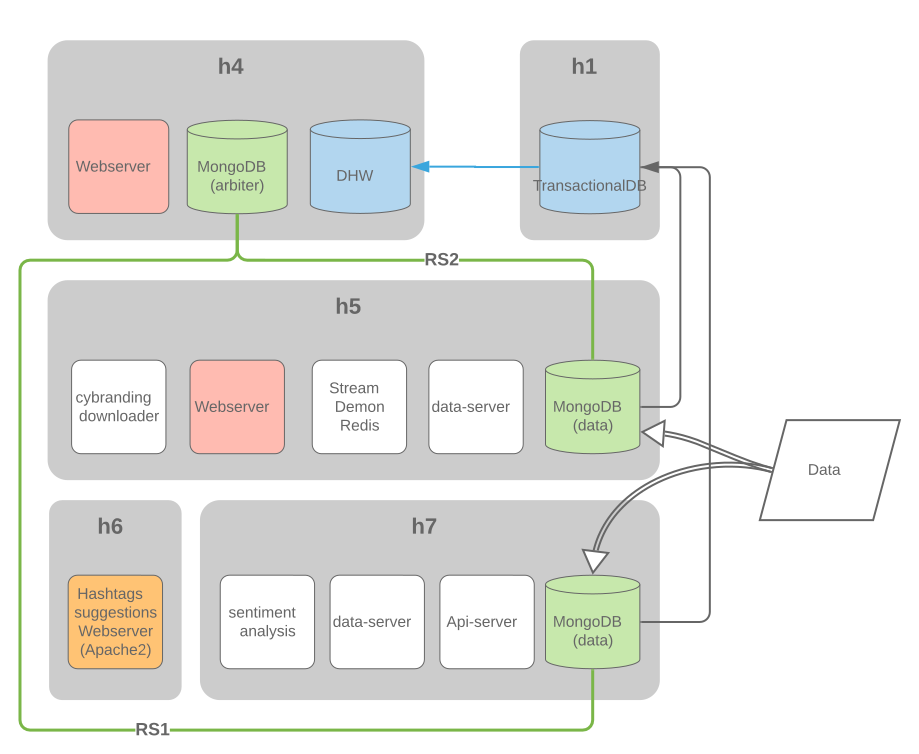
As in the figure above the analysed data goes through three stages:
The just-downloaded tweets and instagrams are temporarily stored inside MongoDB, as a staging area for not very structured data
After the staging area, the data goes through a first analysis step and is saved to our main “transactional” PG instance (hashtagify_pro_production, currently on h1; historically it was on h5, and for some time there has been a hot-standby copy on h1, which was used for some parallel queries)
The next step of the analysis stores the data into two data marts (star schemas) in our “dwh” PG instance (hashtagify_pro_production_dwh, currently on h4). The data marts were originally in the main DB, but it was possible to extract them as there were no joins with the rest of the tables.
Docker
It seems that Docker and docker-compose were used in some servers to replicate the entire hashtagify environment in a single container.
To build Docker environment the branch for git repo is DockerizedProduction.
docker-compose file: https://git.webmonks.org/hashtagify/cybranding/blob/DockerizedProduction/docker-compose.yml
Below is the list of images and containers:
images |
containers |
|---|---|
cybranding_workers_app |
cybranding_workers_app_1 |
redis:3.2.9 |
cybranding_redis_store_1 |
Databases
MongoDB
Warning
Check the informations below before submit the documentation
As said before, the MongoDB cluster was used as a staging area for data after download it. His architecture consists of 2 replica sets, but it seems that both are PRIMARY:
RS1
RS2
Both sets have hashtagify_pro_production DB and
sm_keyword_scan_jsons
tutor_instagram_downloader_media_new
tutor_instagram_downloader_users
collections.
Postgres
Redis
Redis was used to store hashtags and posts data. The data was stored in redis cluster by stream-daemon-redis process, and queried by data-server.
The reason why there are different Redis clusters, each one with multiple nodes, is that the “cluster” feature for Redis didn’t exist when Daniele first had to distribute the data into different machines with different, non-clustered Redis instances. Even today Daniele store different data into different clusters - but we stopped adding new clusters, and instead only add new nodes to the existing ones.
When the amount of data exceeds the capacity of existing machines, we add new ones, add new nodes to the clusters that need space, and reshard.
Redis cluster keys distribution https://docs.google.com/spreadsheets/d/10lnOED0Z5Pu8f1br1bPMTjLxRxsyK9M0IkYChWOZ3r8.
Redis services is monitored by monit, and monit send email alerts if something is not running. It automatically restarts the service if its not running. You can check the redis clusters here https://hashtagify.me/crm/redis_clusters/ and their nodes here https://hashtagify.me/crm/redis_clusters/2 to check on which server they are running.
Workers
The whole Hashtagify analysis is mostly implemented through Rails workers - background daemons that work on queues of jobs to do, and that can be distributed on different servers; many of these are very cpu-intensive. On most servers we run a combination of Redis instances and Ruby workers.
Snapshot of the chart of current workers: https://www.lucidchart.com/invitations/accept/9ed6be89-e8e3-4c79-90c2-61f7c1bbdecc
Workers list
language |
name |
|---|---|
js |
|
js |
|
js |
|
js |
twitter_downloader_worker |
js |
|
ruby |
accounts_need_country_update_worker |
ruby |
campaign_cache_worker |
ruby |
campaigns_cache_worker |
ruby |
csv_export_worker |
ruby |
cybranding-downloader |
ruby |
downloader.js |
ruby |
dwh_worker_instagram_fast |
ruby |
dwh_worker_p1 |
ruby |
dwh_worker_p1_oldest_first |
ruby |
dwh_worker_p2 |
ruby |
dwh_worker_random |
ruby |
dwh_worker_twitter_fast |
ruby |
hashtagify_alerts_worker |
ruby |
instagram_media_downloader_worker |
ruby |
instagram_media_downloader_worker_prof |
ruby |
instagram_scan_add_tweets_worker |
ruby |
instagram_scan_post_process_worker |
ruby |
instagram_scan_users_data_worker |
ruby |
instagram_scan_worker |
ruby |
managed_account_analysis_worker |
ruby |
managed_account_download_worker |
ruby |
managed_account_dwh_worker |
ruby |
pdf_reports_worker |
ruby |
pg_repack_index_worker |
ruby |
sampling_level_upgrade_worker |
ruby |
twitter_scan_post_process_worker |
ruby |
twitter_scan_worker |
ruby |
user_emails_delivery_worker |
Workers Manager
PM2 manage workers on each machine. It seems that PM2 processes are managed by workers manager (cybranding/workers/workers_manager.js), a web server written in node and accessible through a rudimentary web console in hashtagify back-end (it receive commands through HTTP requests).
Workers manager can do the following operations:
git-update
restart workers
shut down workers
change the number of workers on each machine.
Note
All settings in workers manager are hard coded in workers_manager.js including users and passwords.
Monit
Some services (for example Redis) are managed by monit.
To start/stop/restart services monitored by monit, we can issue the following commands:
check monitored process:
monit -vstop process:
monit stop <process_name>restart process:
monit restart <process_name>start process:
monit start <process_name>
Note
The monitrc configuration file for services, resources monitored is located at /etc/monit directory.
Hashtag Encyclopedia
This is a live collection of statistics about millions of hashtags, collected by analyzing billions of tweets starting in 2011. These statistics are used in an interface which works like a search engine; this statistical data is stored with Redis. The same data is also used by our paid API.
The data collection, analysis and querying of Encyclopedia data is done using NodeJS - it has to be a very low-latency client which receives millions of tweets per day. At any given time, there is 1 service, called stream-daemon-redis, which receives a sample of tweets from Twitter, analyzes them, and stores the data to our different redis clusters. There are two or more services, called data-server, that receive the http API calls (internal API or public API), query the redis clusters, and send back the data.
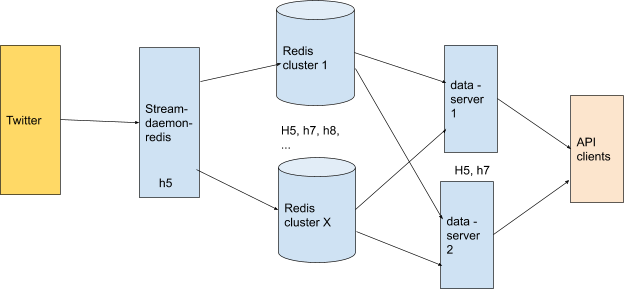
Stream Daemon Redis
Stream-daemon-redis (cybranding/nodejs/hashtagify/stream-daemon-redis.js) gets data from Twitter to keep the hashtags encyclopedia up to date.
Stream Daemon Redis is currently running on H5.
Sentiment Analysis
This is a Python application which runs on H7 (/opt/sentiment/MultiLanguageClassifier).
It works by polling the main hashtagify web app via a http API, and sends back the results in the same way.
Currently it’s started with command:
nohup python3 /opt/sentiment/MultiLanguageClassifier/classifier.py  > \
/opt/sentiment/MultiLanguageClassifier/nohup.out 2>&1&
Note
Sentiment-analysis was versioned under different repository: https://github.com/danmaz74/sentiment_analysis.git.
Now we moved repo to https://git.webmonks.org/hashtagify/sentiment-analysis.
HTTP servers
Front End
Front-end webservers are installed in H4 and H5.
In H5 I found Haproxy instance and configuration in /etc/haproxy/haproxy.cfg. I have more or less understood how HTTP and HTTPS requests were balanced.
Haproxy redirects to itself on port 443 (https) if it receives HTTP request.
Both H4 and H5 have HTTP/HTTPS enabled (h4: 80/443 - h5: 8080/8443).
All requests are proxied to H4 server on port 80.
If H4 server reach
maxconnnumber (set inhaproxy.cfg) Haproxy redirect all incoming requests to H5 on port 8080.
Note
H4 run apache2 under docker container.
H5 has apache2 directly installed.
H5 was also used as testing environment.
Data Server
Data Server (cybranding/nodejs/hashtagify/data-server.coffee) is an API server used by hashtagify.me client to get encyclopedia data.
It use redis cluster to query data.
Now data-server is currently running on H5 and H7.
Api Server
Api server is a coffee script http server (cybranding/nodejs/hashtagify/api_server/api-server.coffee) used by API paying customers to get data from hashtagify encyclopedia. Before our modification it acted as https server (using certificates from api_server dir) binded directly on public interface.
We added Let’s Encrypt certificates and Certbot to renew SSL certificates.
We added Haproxy on H7 as SSL termination proxy and api-server.coffee now is binded to lo interface.
We are not currently using Haproxy instance on H5 because DNS point to H7 public interface and credentials to change DNS have been lost.
Important
Api Server was dependent on Data Server to access encyclopedia data.
To test API using Curl:
curl -X GET \
  https://api.hashtagify.me/1.0/tag/smm \
  -H 'authorization: Bearer 1d70a8dfba9ca6beeae57d6d08c75b29253f011d' \
  -H 'cache-control: no-cache'
Preprod
Warning
This Preprod section is deprecated all pre production servers are powered off. We decided to keep this section only to historicize the architectural changes.
To test and trim data in Redis clusters, we built a pre-production environment. The pre-production environment consists of 3 servers:
hashtagify-preprod01
[46.4.219.227]hashtagify-preprod02
[46.4.241.153]hashtagify-preprod03
[46.4.241.152]
Redis cluster installed consists of 3 nodes:
id |
ip:port |
flags |
slot |
|---|---|---|---|
5726ae15ec12abcaa58b3fe35ae65a436203fc58 |
46.4.241.152:6379@16379 |
master |
10923-16383 |
9ac731e4c4d39dd55af240cda3c3a1ea919f44cb |
46.4.241.153:6379@16379 |
master |
5461-10922 |
d74e19207cba328c1450388d837cecf38fa6451f |
46.4.219.227:6379@16379 |
master |
0-5460 |
redis.conf notes:
maxmemory 250gb
maxmemory-policy allkeys-lfu
Important
We changed default sshd port (22) to port 24 and we disabled password login for security reasons.
Server List
hostname |
CPUs |
Ram |
Swap |
Storage |
More Info |
Dockerized |
|---|---|---|---|---|---|---|
h1 |
32 |
378 GB |
40 GB |
4 x 1.8 TB 1 x 9.1 TB |
yes, but seems unused |
|
h4 |
32 |
126 GB |
4 GB |
3 x 1.8 TB 1 x 9.1 TB |
yes, but seems unused |
|
h5 |
24 |
386 GB |
8 GB |
1 x 250 MB 2 x 894 GB 2 x 1.8 TB 1 x 2.7 TB |
no |
|
h6 |
12 |
128 GB |
4 GB |
1 x 1.8 TB |
no |
|
h7 |
12 |
128 GB |
4 GB |
2 x 1.8 TB 2 x 3.7 TB |
no |
|
h8 |
12 |
128 GB |
4 GB |
2 x 1.8 TB |
no |
|
h9 |
12 |
64 GB |
32 GB |
2 x 2.7 TB |
|
no |
h10 |
12 |
64 GB |
32 GB |
2 x 2.7 TB |
no |
|
h11 |
12 |
128 GB |
4 GB |
2 x 224 GB |
only redis |
no |
h12 |
12 |
128 GB |
4 GB |
2 x 1.8 TB |
no |
|
h13 |
8 |
32 GB |
16 GB |
1 x 8.2 TB |
no |
|
h14 |
12 |
128 GB |
4 GB |
2 x 1.8 TB |
|
no |
h15 |
12 |
128 GB |
4 GB |
2 x 1.8 TB |
detected miner |
no |
h16 |
12 |
128 GB |
4 GB |
2 x 1.8 TB |
|
no |
h17 |
12 |
128 GB |
4 GB |
2 x 1.8 TB |
no |
|
h18 |
12 |
256 GB |
4 GB |
2 x 3.7 TB |
no |
|
h19 |
8 |
48 GB |
24 GB |
2 x 1.8 TB |
|
yes |
h20 |
8 |
48 GB |
24 GB |
2 x 1.8 TB |
|
yes |
h21 |
12 |
256 GB |
4 GB |
2 x 3.7 TB |
detected miner |
no |
hashtagify-preprod01 (deprecated) |
12 |
256 GB |
128 GB |
1 x 118.2 TB |
yes, used for preprod environment |
|
hashtagify-preprod02 (deprecated) |
12 |
256 GB |
128 GB |
1 x 118.2 TB |
yes, used for preprod environment |
|
hashtagify-preprod03 (deprecated) |
12 |
256 GB |
128 GB |
1 x 118.2 TB |
yes, used for preprod environment |
Sysadmin guide
Questa sezione deve essere ancora tradotta, ogni contributo è ben accetto! :)
Questa sezione cerca di coprire i problemi più comuni che si verificano sulla piattaforma cercando di proporre delle soluzioni già pronte per eventuali sysadmin.
Disco Pieno
Identificare i 100 file/directory più grandi con:
du -hS --exclude <dir1> --exclude <dir2> / | sort -rh | head -n 100
nel 90% dei casi lo spazio su disco è occupato da backup temporanei di Redis o da file di log.
Se non è possibile identificare o liberare lo spazio su disco attraverso l’os installato richiedere la Rescue mode su https://robot.your-server.de/server cliccando sul server interessato -> Rescue (si consiglia l’uso della chiave RSA)
successivamente riavviare il server e attendere che venga caricata la modalità rescue
Loggarsi sul server in modalità rescue e montare il disco interessato in
/mnt
Maggiori informazioni sulla rescue mode presso la documentazione di Hetzner: https://wiki.hetzner.de/index.php/Hetzner_Rescue-System/en
Aggiunta nuovo disco o componente Hardware
Nel caso in cui non sia possibile liberare spazio su disco seguire la seguente procedura per la richiesta di nuovo spazio:
vedere l’hardware disponibile per il server su cui si fa l’upgrade https://wiki.hetzner.de/index.php/Root_Server_Hardware/en
per avere maggiori informazioni sul disco o l’hardware installato usare l’IDRAC del server o in alternativa attivare la Rescue mode, riavviare e utilizzare Racadm (è già preinstallato nel OS di rescue)
Di seguito un esempio di richiesta fatto a support@hetzner.com per la rimozione di un disco e l’aggiunta di un altro da 10TB:
> Dear Support,
> we need to remove the faulty drive:
> Serial Number: S1M7NEAG200189
> Slot Number: 7
> We confirm the full data-loss for this drive.
> We need to add another drive on slot 7:
> -------------------%<-----------------
> 10 TB SATA Enterprise Hard Drive     € 19.50/month
> ------------------->%-----------------
> Prices plus VAT, if applicable.
Disco pieno su H1
Sul sever H1 vi è un istanza di postgres che spesso ha problemi
di spazio su disco a causa delle dimensioni degli indici, tuttavia lo
spazio disco viene riempito molto lentamente. Questo è uno snapshot
dello spazio disponibile sul server H1 riguardo le unità interessate
al 24/07/2020:
Filesystem      Size  Used Avail Use% Mounted on
/dev/sda3       9.0T  4.4T  4.2T  52% /
/dev/sde1       1.8T  1.4T  287G  83% /data_noraid2
/dev/sdb1       1.8T  1.4T  283G  84% /data
/dev/sdc1       1.8T  1.5T  167G  91% /data_noraid
/dev/sdd1       1.8T  992G  680G  60% /data2
Important
il disco con il 91% di spazio utilizzato impiegherà almeno 3 mesi prima di riempirsi completamente.
Un operazione comune svolta quando uno dei dischi si riempie è quella di spostare gli indici/tabelle da un tablespace a un altro.
Prima di tutto, identificare le tabelle/indici che occupano più spazio. Loggarsi su
H1e lanciarepsqlcome utente postgres, in alternativa è possibile collegarsi con utente: rails, pw: rails. Dopodichè eseguire la seguente procedura:postgres=# \c hashtagify_pro_production You are now connected to database "hashtagify_pro_production" as user "postgres". hashtagify_pro_production=# SELECT nspname || '.' || tablename AS "table", relname AS "relation", pg_size_pretty(pg_relation_size(C.oid)) AS "size", B.spcname FROM pg_class C LEFT JOIN pg_namespace N ON (C.relnamespace = N.oid) LEFT JOIN pg_tablespace B ON (C.reltablespace = B.oid) LEFT JOIN pg_indexes D ON (relname = indexname) WHERE nspname NOT IN ('pg_catalog', 'information_schema') ORDER BY pg_relation_size(C.oid) DESC;
Spostare le tabelle/indici dal disco più saturo al disco meno saturo con il comando:
ALTER TABLE/INDEX <tabella/indice> SET TABLESPACE <tablespace>;
ad es.
ALTER TABLE sm_keyword_sample_dates SET TABLESPACE big_disk;
Di seguito la lista di tablespace e i path relativi ad essi:
Mountpoint  Path               Tablespace
/       /postgres_tablespace       big_disk
/data2      /data2/postgresql      ssd2
/data_noraid    /data_noraid/postgresql    ssd_noraid
/data_noraid2   /data_noraid2/postgresql   ssd_noraid2
Ram piena
Fino ad oggi l’unico motivo per cui la RAM dei server è stata saturata più volte è la storicizzazione delle chiavi sui cluster Redis. Hashtagify presenta più di un cluster Redis in futuro si spera di accorpare tutti questi cluster in un unico. Presenta anche singole instanze Redis lanciate non in cluster mode. I cluster redis sono quasi tutti di versioni differenti principalmente le versioni usate sono la 3 e la 5. Via via che vengono fatti interventi di riparazione, i cluster verranno aggiornati alla versione 5 o superiore, che oltre ad offrire una compressione in memoria migliore, presenta anche delle funzionalità aggiuntive.
Le operazioni più comuni che vengono svolte quando viene riempita la ram
sono: * Identificare quali Redis debbano essere UP sul server. Fino
ad oggi è bastato andare nel path /etc/init.d/ e ispezionare gli
script di startup di Redis. O alternativamente lanciare il comando come
root:
service --status-all
Solitamente essi seguono la nomenclatura redis_<porta>.
Spegnere tutti i nodi redis attivi sul server apparte il nodo che ci interessa (solitamente vengono avviati da systemd), lo script per l’avvio è presente di solito in
/etc/init.d/redis_xxxx. Per stopppare il servizio basta lanciare come root il comando:service redis_xxxx stop
se il servizio continua ad avviarsi una procedura brutale ma efficace è:
chmod -x /etc/init.d/redis_xxxx
sh /etc/init.d/redis_xxxx stop
una volta spenti gli altri nodi presenti sul server il nodo Redis avra a disposizione più RAM e potrà finalmente avviarsi.
Entrare nella directory
/rootall’interno di essa vi sono tutte le versioni di Redis compilate in uso sul server.Identificare la versione relativa al nodo di cui si vuole fare il reshard ed entrare nella directory
src, ad es.:cd /root/redis-3.2.3/src/
Important
Redis 3 a differenza di Redis 5 (che usa
redis-cli) usa ancora redis_trib.rb per il reshard, fix e check del cluster
una volta che il nodo ha caricato tutte le chiavi in memoria, fare il check del cluster e in caso il fix lanciando
./redis_trib.rbper la versione 3 o in alternativa./redis-cliper redis 5 nella directorysrc. Successivamente una volta che tutti gli slot sono coperti correttamente fare il reshard del nodo, spostando alcuni slot su nodi che hanno più memoria a disposizione. Comando di esempio per Redis 3:cd /root/redis-3.2.10/src nohup ./redis-trib.rb reshard --from aee4ad1c354ae46c1044058ee80fb7a10826a6e9 --to 8a0f6d8102cbd3a5a938626c354fb0fd20fa6381 --slots 100 --yes localhost:7004 &
Completato questo passaggio rendere nuovamente eseguibile gli init script e lanciare i nodi precedentemente arrestati:
chmod +x /etc/init.d/redis_xxxx
service redis_xxxx start
Di seguito uno snapshot dei cluster redis conosciuti:
Cluster 1 (Redis 3):
8d34976962eba83c6f4b3dcd6e9100af0fc55a66 144.76.39.119:7006 master - 0 1595840005162 38 connected 16378-16383
abd16d025e80e06fbc315703cb9f21989ae0dd2a 88.198.63.53:7001 master - 0 1595840007171 4 connected 6912 7044 7221 7340 7345 7406 7456 7485 7523 7588 7625-8191
1ad2f79377a838081e0dafeee709cd02cf177d2b 78.46.88.41:7002 master - 0 1595840004160 18 connected 3341-5065 5461-6911 6913-7043 7045-7220 7222-7339 7341-7344 7346-7405 7407-7455 7457-7484 7486-7522 7524-7563
3b78c5572eba33298acc91473c343de67a259d42 176.9.26.107:7005 master - 0 1595840004160 23 connected 1848-2298 8606-10142 10923-12963 12965-13003 13005-13200 13653-16377
f4ebfcba3eee69a307342b838f6436b1d4ce6981 5.9.72.199:7003 master - 0 1595840007173 10 connected 8258-8605
9a81441c7f2c7b47cc79970ff574db107cedb82b 88.99.70.164:7007 slave,fail 29fe091918eb4cfae2e0ecb992f2db8d3fde44ed 1595254597518 1595254597518 34 disconnected
fbd28be1f4f29443690941d3c075e888f05089fe 144.76.194.185:7002 master - 0 1595840008173 25 connected 10143-10477 12964 13004 13201-13652
0f8f5fc97b8cd8453afe231947a542877ce2c20c 88.198.63.53:7002 master - 0 1595840005162 8 connected 5066-5460
c89de72c1266b8e6aef8c5fe4cfa38629e7855a8 88.198.63.53:7000 handshake - 1595840008374 0 0 disconnected
181fb33b6fea9992b2ecf301f0df1592c2c33ef6 188.40.136.9:7006 slave 8d34976962eba83c6f4b3dcd6e9100af0fc55a66 0 1595840005162 38 connected
641ed2bf9de01180ffb3426802fb2284a17ebc3a 88.198.63.53:7003 master - 0 1595840007173 22 connected 0-1847 8192-8257
cd6ff64451b4cf5ac2826703c2aabfd6136820ad 5.9.72.199:7004 master - 0 1595840006165 11 connected 10478-10922
29fe091918eb4cfae2e0ecb992f2db8d3fde44ed 148.251.82.44:7008 myself,master - 0 0 34 connected 2299-3340 7564-7587 7589-7624
Cluster 2 (Redis 5):
5ca31df754d85f8f65fe2302668ad554aef60b52 46.4.81.16:7003@17003 master - 0 1595840048248 19 connected 8231-8424 12010-16383
c7ab2bf25d07d5b4748a36d76b32969664744c46 144.76.194.185:7001@17001 master - 0 1595840047246 23 connected 0 2203-6568
aee4ad1c354ae46c1044058ee80fb7a10826a6e9 148.251.82.44:7004@17004 myself,master - 0 1595839827000 22 connected 9188-12009
8a0f6d8102cbd3a5a938626c354fb0fd20fa6381 144.76.39.119:7002@17002 master - 0 1595840045242 24 connected 1-2202 6569-8230 8425-9187
7a909f66c5394efa8dcde11957c6899dbb8e90b0 88.99.70.164:7000@17000 master - 0 1595840046245 20 connected
Cluster 3 (Redis 5):
8b6accb0259089f4f5fc3942b34fb6b7fcbde33e 144.76.39.119:7014@17014 myself,master - 0 1595839915000 10 connected 51-592 926-1074 1076-1097 6566-6903
6f70203705a1f26b561f39a600930f7b22dfeb98 88.198.218.140:7010@17010 master - 0 1595839917000 31 connected 1168-1267 1269-1317 1319-1441 1443-1531 1533-1731 1733-1775 1777-2162 2164-2187 2189-2349 6912 7044 7221 7340 7345 7406 7456 7485 7523 7588 7729 7794 7861 7926 7937 8039 8069 8163 8304 8436 8512 8644 8722 8994 9118 9266 9398 9537 9572 9669 9696 9771 9906 10151 10212 10289 10421 10562 10694 10768 10900 10991 11092 11107 11164 11273 11312 11350 11444 11474 11510 11520 11587 11719 11788 11793 11814 11858 11925 11990 12014 12036 12083 12122 12130 12160 12262 12369 12501 12641 12773 12851 12903 13059 13105 13247 13331 13392 13463 13637 13664 13761 13796 13834 13891 13971 14198 14214 14277 14352 14484 14509 14691 14823 14851 14856 14897 15029 15054 15170 15293 15302 15377 15479 15509 15519 15603 15649 15714 15825 15846 15879 15917 15920 15987 16052 16079 16119 16195 16251 16289 16327 16368
9527684833c252c5dd0ee5f44afa13730cb689ee 5.9.72.199:7011@17011 master - 0 1595839917940 2 connected 0-50
0a52eec580372bd365351be0b0833dbd364aa633 46.4.73.15:7013@17013 master - 0 1595839916000 4 connected 3582 3600 3732 3799 3872-6565
80570f4d791d9834bd28322c25337be00e1370b2 88.99.70.164:7015@17015 master - 0 1595839915000 30 connected 2350-2359 6904-6911 6913-7043 7045-7220 7222-7339 7341-7344 7346-7405 7407-7455 7457-7484 7486-7522 7524-7587 7589-7728 7730-7793 7795-7860 7862-7925 7927-7936 7938-8038 8040-8068 8070-8162 8164-8303 8305-8435 8437-8511 8513-8643 8645-8721 8723-8993 8995-9117 9119-9265 9267-9397 9399-9536 9538-9571 9573-9668 9670-9695 9697-9770 9772-9905 9907-10150 10152-10211 10213-10288 10290-10420 10422-10561 10563-10693 10695-10767 10769-10899 10901-10990 10992-11091 11093-11106 11108-11163 11165-11272 11274-11311 11313-11349 11351-11443 11445-11473 11475-11509 11511-11519 11521-11586 11588-11718 11720-11787 11789-11792 11794-11813 11815-11857 11859-11924 11926-11989 11991-12013 12015-12035 12037-12082 12084-12121 12123-12129 12131-12159 12161-12261 12263-12368 12370-12500 12502-12640 12642-12772 12774-12850 12852-12902 12904-13058 13060-13104 13106-13246 13248-13330 13332-13391 13393-13462 13464-13636 13638-13663 13665-13760 13762-13795 13797-13833 13835-13890 13892-13970 13972-14197 14199-14213 14215-14276 14278-14351 14353-14483 14485-14508 14510-14690 14692-14822 14824-14850 14852-14855 14857-14896 14898-15028 15030-15053 15055-15169 15171-15292 15294-15301 15303-15376 15378-15478 15480-15508 15510-15518 15520-15602 15604-15648 15650-15713 15715-15824 15826-15845 15847-15878 15880-15916 15918-15919 15921-15986 15988-16051 16053-16078 16080-16118 16120-16194 16196-16250 16252-16288 16290-16326 16328-16367 16369-16383
2449b5c076d051ec702a89b38c65a772d0f88cee 176.9.26.107:7016@17016 master - 0 1595839917000 28 connected 593-925 1098-1135 1137-1167 3329 3356 3394 3461
5b887a2fc38eade4b6366b4d1de2926733e082d2 148.251.68.46:7012@17012 master - 0 1595839914029 8 connected 1075 1136 1268 1318 1442 1532 1732 1776 2163 2188 2360-3328 3330-3355 3357-3393 3395-3460 3462-3581 3583-3599 3601-3731 3733-3798 3800-3871